Thursday, June 22, 2017

The hour code


Hi and welcome back to our blog! Today we wanna talk about some activities we have done last weeks in NTYCX  classes; we worked with Khan Academy. Khan Academy it's a non-Profite educational page where you can learn different topics, for example code, programing and much more.  The goal is that all have access to education easily and can learn new topics about computing.

We had to complete a project called ''The Hour Code'' that is about drawing only by codes. Sounds difficult, no? But we found it very easy because it didnt have only text, so it had videos, GIF and talking explanations that showed you how to do it. Khan Academy helps you with each Entrepreneurship!


Challenges:


The challenges are one of the interactive activities that Khan Academy offers to you. The challenges or tasks that you have to find a solution to each of them, were created to prove your knowledge and show what you have learned with these topics that Khan Academy has prepared for you.
For each step of the challenge there a video before that explains you and gives you tools so you can resolve them properly. As soon as you complete the task, the platform will give you another task until you are done with the unit and you get the necessary points.


Our first challenge was to create a "simple snowman" with codes. We had to draw a snowman by using the "ellipse" command.

Projects:

The Projects are the final challenges where you show all what you learn about that topic. It summarize all the commands that we learn and appear in every challenge we did. You have to use them to make a final project.
We had to choose to draw between a snowman, a wild animal or a Self portrait. We decided to build an animal first because it was the project that we found more interesting and creative to us.

We created a cow:

The commands that we used were the followings:

-ellipse: for the body, face, legs and blemishes of our cow and for the sun  too
-rect: for drawing the floor
-line: to create the birds and details of the cow
-fill: we used to fill the figure we wanted with the color we wanted to
-background: to color the backgroung
-noStroke: to disables the contours of the figures


Badges and energy points

 You can earn badges doing specific things in Khan Academy. This are like a prizes for watching a video, complete the project or for specific stuff.
There are Badges that are very difficult to earn and that encourage you to keep working to get it all and to become smarter in the topic that you are working.

Here we can see all the Badges that you can earn in Khan Academy


Here we left you a summarize about “The Hour Code” if you want to try it and to know something more about codes.
We suggest you to try it, it really worth it.

At the first we thought it would be boring and heavy, but with the time you wanted to keep duing it.

Tuesday, June 20, 2017

Khan Academy- The hour of code

  Hello!
   Today we are going to talk about our last class project, that was drawing with code. First if we didn't have an Khan Academy account, we needed to create us one. And for you, which have no idea of what Khan Academy is: It's a free  platform, that offers a personalized learning resource, for all ages. We began the hour of code (drawing with code). The objective of this porject is that you learn to encode, following step by step rules. To achive this you may see some good videos that already are in Khan Academy. Then you will be ready to make the first challenges, which are the most simple. And to finish there is a final challenge that is more complicated than the first, so it requires more creativity and skills.


Here we let you this videos for you to understand better:


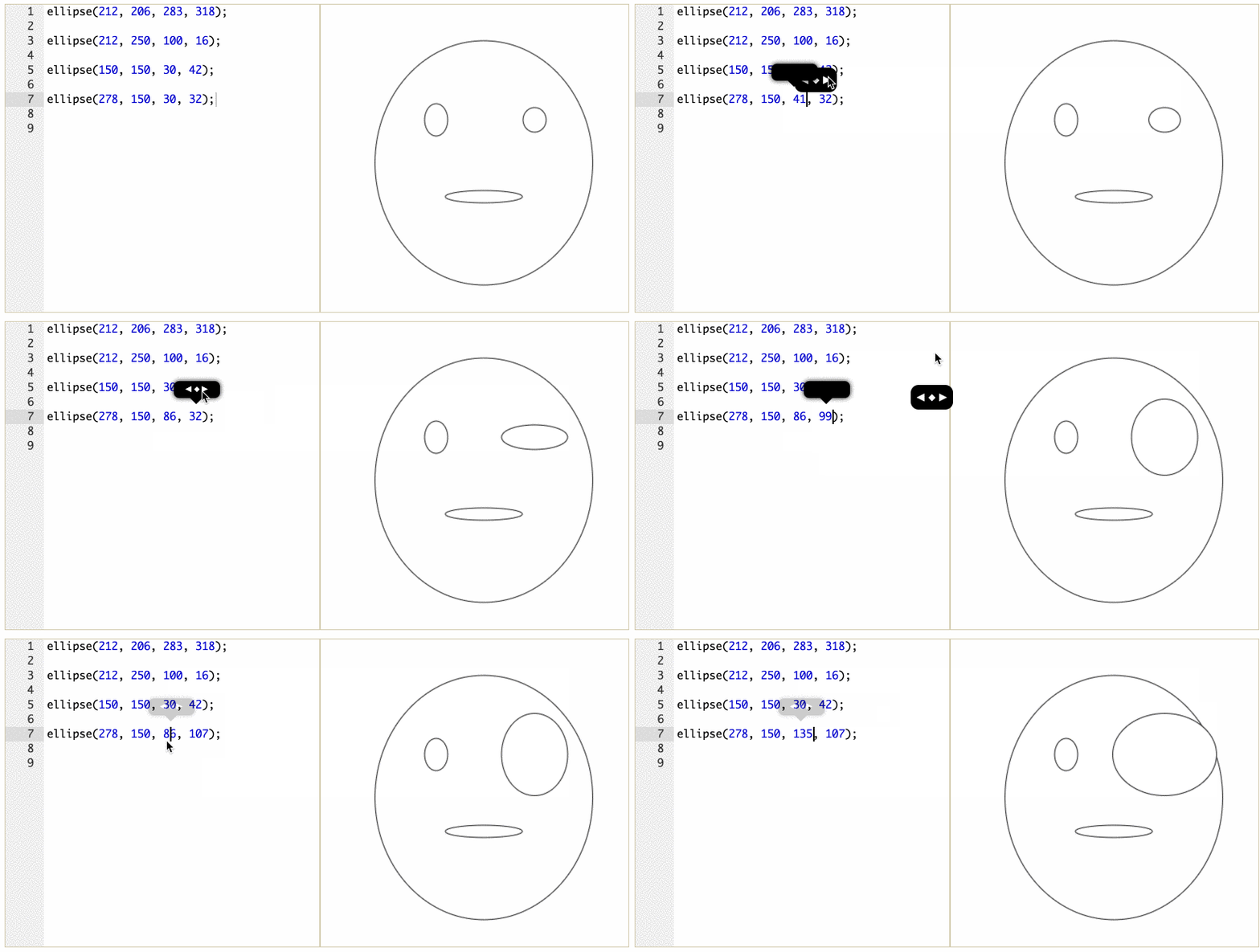
Here you have an example of how you can change the command to look like you want to.
First you have to put a logic number so the form appears on your screen, and then you change it in the way you want to look it, like in this image.


There are many types of forms to do, here you can see some of them:

There are so much things you can do with the commands, like putting color on every form you want, you can make rectangles(putting the right command), triangles, points, lines, arcs and much more.
Basically you can do everything you want.

This is how it look my finished project


Like I said there are a few challenges that you have to make and before each challenge there are somo videos that explain how you have to do it. For each part you can earn points. If you wach the videos you will get some points, if you do correctly the ercercise you also will get some points.

Maximal points for each task:


  • challenge completed: 1500 points

  • video watched : 750 points

  • project completed: 2100 points


This is the energy I earned, because I made the project


There are so many challenges, if you want to know more about programming, you can search in Khan academy the hour of code and you can begin it and earn your own energy. 
I hope you will so and good luck learning. 

I let you a video so you kmow how to sign up in Khan academy;


THE HOUR OF CODE (Khan Academy)


Hey everyone! How are you doing? Last week, during our NTYCX class, all my classmates and us worked a lot with an exercise called “The hour of code” in Khan Academy. What is Khan Academy? It is quite simple, it is an educational page, where the users have to do different exercises about different topics. The goal of this website is quite clear: to bring education in a simple and fast way to everyone. The topics, which are explained, are basically all about computing and maths and there are different videos, which help understanding the topic and therefore doing the exercise.

In the hour of code you get as many challenges as information to understand better your excersices. 


The challenges are done for improve your knowledge and help you. For each step you accross there is a video for the explanation and a challenge for showing what you learned.
Finally, when you end with the challenges, you have to do three different projects which are done by yourself without any helps. We could say the project is the last step of the excersice, here you have to show your creativity and your knowledge of the topic.


                  This is a snowman project we had to do.

For create a snowman as this one you need functions for creating every figure(input) and if you end the function properly the figure will apear in the right side (output). But you will be probably asking yourself: How do I do that?
Well, it is simple. For creating a function you need to write the form you want and then some particular signs next to it. For example for an ellipse:


Dont panic ellipse is not the only figure you can do. This are the different figures and their functions you can use for your projects in this programm. There are many of them.


This is one of the videos Khan Academy gives you to learn about doing functions. This video teaches a few new concepts for beginners.


The videos will always have more advanced concepts. 


Challenges:
In this exercise there are three different challenges and another three projects.  

Energy points are the ones you get after you passed a project or a challenge or you have watched a video.


On the other hand, badges are prizes. For example, there are “Challenge Patches”, which are different awards you get after you complete topic challenges.


Here is a photo of different badges you get in “Meteorite badges”.

That is all guys! We hope you liked our post! Remember to share it with your friends and stay tunned for future posts!

Francisco Tapia and Ignacio Garcia

Our first week in Khan Academy


The second term has started two weeks ago, and so has the work with Khan Academy too. In our informatic class, our teacher wanted us to work with a Website in which you introduce a certain code and so you are able to “draw” whatever you want, for example wild animals. This Website is called Khan Academy. At the beginning you may get confused, however the Website is programmed to teach anyone! So don't worry if the beginning is hard! Khan Academy will show you in videos, how to do it. Afterwards you have a lot of opportunities to learn coding objects.


To make you a keen Khan Academy user, this programe uses a very productive method. Every thing you do will get points. If you watch videos on Khan Academy you will get some points. If you do some exercises you will get points too.
Compleating some projects will give you more points then watching a video, however to be able to compleat the project sucsessfully, you have to watch the videos first.

Maximal points for each task


  • challenge completed: 1500 points

  • video watched : 750 points

  • project completed: 2100 points


Here you can see how much badges and energy points we have earned until now in Khan Academy:


Earned badges :


1. Example of a video:


2. Challenge

This challenge is the second challenge we had to deal with in the Khan Academy. We had to build a ´waving snowman`. In this challenge the arms are the ones, that were very difficult because you have to put them on the right place. But it wasn't that easy like it looks. The arms and the bottom had to be on the right place . The arms were all the time spinning around and we were struggling ,to pick the right numbers so they stay in the place they belong.Here you can see what a challenge looks like in the Khan academy and our result :


To make this challenge, there are 3 types of codes to draw with code in Khan Academy:
  • ellipse (the body from the snowman)
  • line (the arms from the snowman)
  • rect (the bottom were the snowman stands on)

After you put a type you want to ´draw´with you put ( after that ,your numbers you want to use, then ) and at the end very important ;


3. Final Project:

After two sessions, we had advanced a lot! That’s why the turn of making a project had arrived! We choosed making a wild animal, and we had the idea of creating a giraffe.

This is how it looks:


If you look how the final product look, you will see following image:


However to get this images the code looks in a different way:


During the work in Khan Academy we had to apply a lot of things we had seen in class. Maybe we did not realize, however we did use the learned topics.
Some examples are that in Khan Academy we had to write the input that the computer sees. The computer reads and processes the input following specific rules. At the end we have the output. In this case the output is a giraffe. This process is exactly, as we saw in class, what the Turing Machine and the CPU does.

Our teacher had also teached us about how computer see different colors. We had to apply this when we colored the animal.


If you want to learn more about this page, create a account yurselve! Trying yourselve is the best form to learn! 
Create a Khan Academy account.


Drawing with codes


The second Term started and our teacher, Anselmo Benassi from the NTYCX class, gave us a new project. The first classes he showed us that we could make colors with codes (For example: red       is #FF0000). Then we started using “Khan Academy”, a website that is used to learn and explain different topics. It is not a normal page, it is like a game where you can learn. You have to overcome different challenges and you win points or badges. Here each of us made an account to learn with this Website. We used it to learn how to “draw” with codes. We started working with The hour of code - Drawing with code.
When we started using this, we knew nothing about drawing with codes and now we have a lot of knowledge thanks to Khan Academy, we think that this way of learning is incredible.
In this blog we will show you how it works.

Work structure

The task in the hour of code started with watching videos or reading some important information. If you want to win 750 points, do not skip any second of a video, watch it from the start to the end.

Then we had to make lines or circles with the codes that  the website had taught us in the videos. When we were finished with the basic steps and the challenges, we had to create a simple snowman and you win 1050 points for completing the challenge.

To be sure that we understand how to use codes to draw, we have to make a final project. We had to choose between making a complete snowman or a wild animal. When we finish the project we receive 2100 points.


To draw with codes we can use differt shapes and forms.